Strum - Play Guitar
- 4.7
- Rating
- 100.00K
- Installs
- Free
- Price
 Analysis by App-foxy
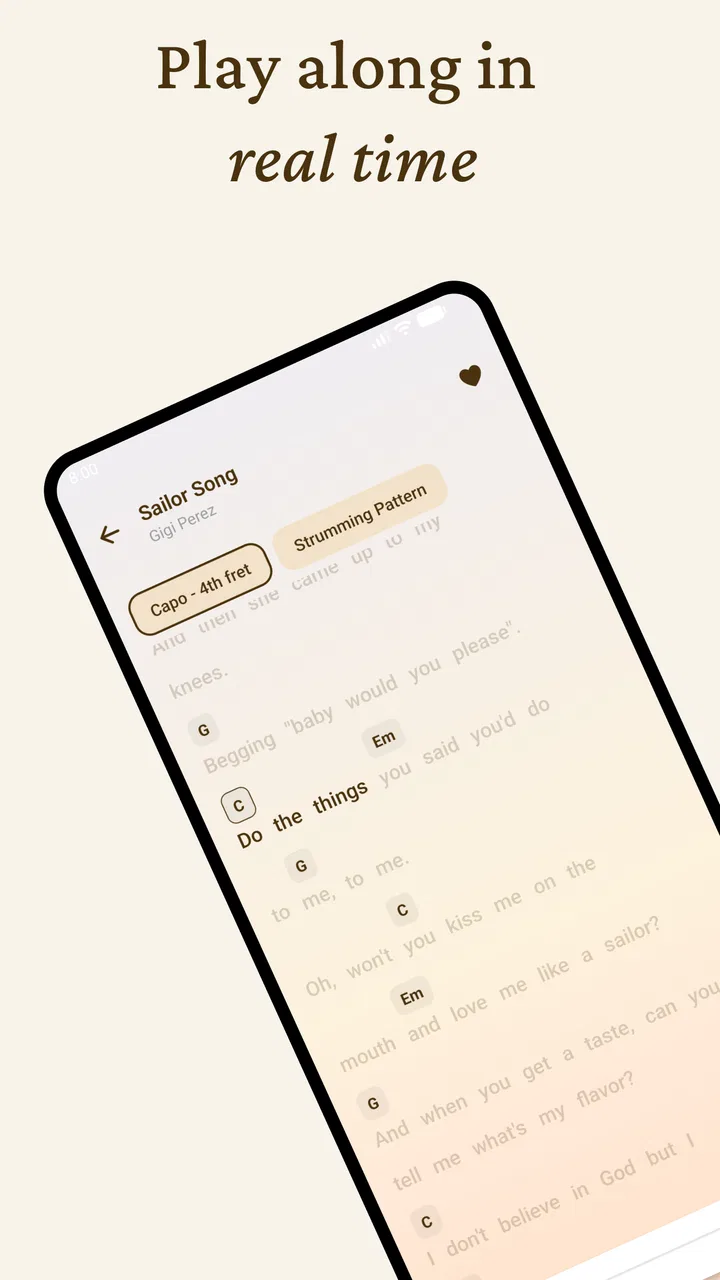
Strum - Play Guitar is a music and audio app built around one clear idea: making guitar-style playing approachable on a mobile device. I found its focused concept more interesting than a crowded app that tries to be a tuner, lesson library, recording studio, and streaming service all at once. Here, the appeal is the directness of picking up a phone and exploring songs through a strumming interface.
The app is free to download, and Vert Media Partners presents it with the simple promise of playing your favorite songs. That simplicity is important because it sets the right expectation: I see Strum as a casual playing companion rather than a complete replacement for a real guitar or a structured music course. It is best suited to quick sessions, musical experimentation, and people who want to try guitar-like interaction without first buying an instrument.
How the guitar-playing idea feels in everyday use
The central capability is the ability to strum through a phone-based guitar experience. In practice, that changes the way I approach the app. I do not open it expecting a long setup routine. I open it when I want an immediate musical activity: testing a rhythm, passing a few minutes, or trying to follow the feel of a familiar song.
You May Also Like

 AccuWeather: Weather Radar
AccuWeather Review: A Quick, Clear Forecast for Everyday Decisions
For everyday plans, the best forecast is the one you can understand quickly. AccuWeather makes rain timing, radar, and local conditions easy to act on, with a few trade-offs.

 Hill Climb Racing
Why Hill Climb Racing Still Turns Crashes Into One More Run
A tiny car, a bumpy hill and one more upgrade: Hill Climb Racing keeps resurfacing because its simple chaos makes every near-miss feel personal.

 AliExpress - Shopping App
AliExpress Makes Global Shopping Feel Personal, but Shoppers Bear the Risk
AliExpress turns a global marketplace into a pocket-sized discovery engine. Its reach is useful, its shopping loop compelling, and its trade-offs easy to miss.

 Lords Mobile: Kingdom Wars
Lords Mobile Is a Kingdom-Building Routine, Not a Quick Match
A case-by-case verdict on the building, battles, device demands, and social commitments that make Lords Mobile rewarding for some players and exhausting for others.

 PDF Scanner app - TapScanner
TapScanner Makes Paperwork Easier to Capture, Check, and Share
TapScanner makes scanning with a phone feel less like a rescue operation and more like a dependable step in getting work done. Its capture tools are useful, though not flawless.

 Block Blast!
 Shows How Much a Puzzle Game Can Leave Out
A quiet grid game shows why puzzle players increasingly value instant clarity, repeatable skill and low-pressure play—and where the genre still needs to catch up.
More From Our News Desk
View All News


That directness also makes the app less intimidating for beginners. A physical guitar can be uncomfortable at first, especially when finger placement, string pressure, and rhythm all compete for attention. A mobile interface removes much of that physical barrier. I can concentrate on timing and the movement of a strum without worrying about sore fingertips or a poorly tuned instrument.
The trade-off is that a screen cannot reproduce the full response of a guitar. A real instrument gives feedback through string tension, resonance, finger pressure, and changes in picking strength. Strum is therefore most convincing as an accessible musical simulation. It can help someone understand the basic pleasure of accompanying a song, but it should not be treated as a complete path to confident physical guitar technique.
I also think the app’s strongest value comes from its narrow focus. A person who wants to play immediately may prefer this kind of dedicated tool over a broad music application filled with unrelated menus. The store summary is short, but the concept itself is easy to understand: choose a song-oriented experience and start strumming. That makes the first decision simple for a new user.
What changes when the phone becomes the instrument
Using a phone as a guitar has a practical advantage that is easy to overlook: availability. A guitar takes space, needs care, and is not always convenient in a shared room, on public transport, or during a short break. A phone is already in my hand, so the barrier between wanting to play and actually playing is much smaller.
This makes Strum particularly suitable for spontaneous practice of musical timing. I can use a short session to think about where a downbeat belongs, how evenly a repeated rhythm feels, or whether I can keep a steady pattern while listening. Those are useful habits, even though the app cannot fully teach the physical mechanics of a six-string instrument.
There is another subtle benefit for complete beginners. Because the interface is less physically demanding than a guitar, users can experiment without feeling that every mistake is obvious. That low-pressure environment may encourage someone who would otherwise avoid music apps altogether. I would recommend starting with a simple rhythm rather than trying to imitate a complicated performance immediately. The goal is to develop a sense of pulse first.
For parents or friends introducing music to a teenager, the Teen content rating is worth keeping in mind. It places the app in a category that is not aimed exclusively at very young children, while still making it relevant to older kids and adults who want a casual musical activity. I would still let the individual user’s comfort with mobile purchases guide how the app is used, since optional in-app items cost $6.99 each.
A realistic use case: a five-minute music break
My favorite use case is a short break between tasks. Imagine someone waiting for a bus, sitting in a dorm room, or taking a few minutes away from homework. Carrying a guitar would be unrealistic, and opening a full music-production app would feel excessive. Strum fits that moment because the activity is immediate and self-contained.
I would use it in three stages. First, I would choose a familiar song or musical idea rather than searching for something technically demanding. Next, I would play slowly enough to notice whether the rhythm stays consistent. Finally, I would repeat the same pattern once more without changing it, which is a better test of control than constantly switching songs.
This workflow highlights an important strength: the app can turn idle time into a small, repeatable music habit. It does not require a dedicated room, equipment, or a long lesson. The limitation is equally clear: a five-minute phone session may build confidence and rhythm awareness, but it will not provide the tactile practice needed to form guitar calluses, improve chord transitions on a real fretboard, or develop accurate finger placement.
For that reason, I would pair it with a physical guitar if learning the instrument is the long-term goal. Strum can serve as a low-pressure warm-up or a way to think through rhythm away from the instrument. It should not be the only practice method for someone preparing to perform or take formal lessons.
Where it stands beside usual music alternatives
Compared with a streaming music service, Strum is more interactive. Streaming is excellent when I want to listen, discover artists, or let music play in the background. It does not usually give me the feeling of actively accompanying a song. Strum is better when I want my hands involved, even if the musical control is more limited than with a real instrument.
Compared with a guitar-learning course, the app is more approachable but less comprehensive. A structured course can explain posture, chords, technique, progression, and practice goals. Strum is easier to start because it removes much of that preparation, but it does not offer the same kind of systematic education. Someone who wants measurable improvement should look for a dedicated learning path alongside it.
Compared with a digital audio workstation, Strum is far less complicated. That is a benefit for casual users who do not want tracks, effects, timelines, or recording workflows. It is also a limitation for musicians who want to arrange, edit, mix, or export a finished piece. The right choice depends on whether the goal is playful performance or production.
Compared with a physical guitar, the phone wins on portability and accessibility. The guitar wins on expression, tactile feedback, and transferable technique. I would choose Strum for convenience and experimentation, but I would choose the physical instrument for serious skill development.
Small habits that make the experience more useful
The first habit I recommend is to use a consistent posture. Even with a phone, holding the device in a stable position makes the strumming motion feel less accidental. If the screen moves every time I interact with it, it becomes difficult to tell whether a rhythm problem comes from my timing or from the way I am holding the device.
The second is to begin with repetition instead of variety. It is tempting to jump between songs because the app is easy to start, but repeating one simple pattern gives better feedback. I can hear whether the tempo drifts and whether my movements become uneven. This turns a casual session into a small exercise rather than a sequence of disconnected taps.
A third useful approach is to separate listening from playing. I would first listen to a song or recall its basic pulse, then use the app to reproduce the broad rhythm. Trying to copy every detail immediately can make a simple activity frustrating. Strum works better when I focus on the main beat and gradually add complexity only when the foundation feels comfortable.
Finally, I would treat purchases cautiously. The app is free, which makes it easy to try without committing money at the start, but individual in-app items are priced at $6.99. Before buying anything, I would make sure the extra content or function directly supports the way I plan to use the app. Casual users may find the free starting point sufficient, while frequent players may consider a purchase more worthwhile if it adds meaningful variety.
The practical limits I noticed
The biggest limitation is the gap between simulated strumming and real guitar technique. If I want to learn how to press strings cleanly, move between chords, control muting, or use a pick, a phone interface cannot provide the same feedback. It may help with the idea of rhythm, but it cannot fully train the hands for an acoustic or electric guitar.
Another limitation is that screen-based play can become repetitive for experienced musicians. A beginner may enjoy the accessibility, while a guitarist looking for nuanced dynamics may quickly want more control. The app’s focused design is an advantage for simplicity, but it also means that advanced players should not expect the depth of dedicated music hardware or professional software.
There is also a difference between recognizing a song and truly accompanying it. A familiar melody can make a session feel rewarding, yet that does not necessarily mean the user is learning the underlying chord structure. I would use Strum as a way to engage with songs, then turn to chord charts, lessons, or a real instrument when I wanted to understand how the music is constructed.
Device compatibility is relatively broad because the minimum operating system is Android 7.0 or later. That makes the app accessible to people who are not using the newest phone. Still, the quality of the experience will depend on the individual device’s screen, responsiveness, and comfort in the hand. A smaller screen may make interaction feel cramped, while a larger phone may be easier to hold during longer sessions.
Who will get the most from this app
I think Strum is most valuable for curious beginners, casual music fans, and people who want a portable way to interact with songs. It is also a good fit for someone who likes the idea of guitar but is not yet ready to purchase an instrument. The free entry point makes experimenting easy, and the app’s straightforward purpose avoids the learning curve associated with production software.
It may also appeal to existing guitarists as a lightweight rhythm companion. I would not use it to replace practice, but I could see its value when a real guitar is unavailable. A musician can think through a basic accompaniment pattern, maintain a sense of timing, or simply stay connected to the habit of playing during travel.
The audience response suggests that the concept is connecting with many users: the app has a 4.7 average from around 11 thousand ratings and has passed 100 thousand installs. Those figures do not change the need to judge the experience personally, but they do indicate that the simple guitar-playing idea has attracted substantial interest.
I would skip it if my main goal were formal guitar education, professional recording, or highly detailed sound design. In those cases, a real guitar, a structured lesson app, or a full music workstation would be a better investment of time. I would also skip it if I only want to listen to songs, since a conventional audio player or streaming service is designed more directly for that purpose.
Current position and overall recommendation
Strum is still a young app, with version 0.0.5 currently available and a release date of April 8, 2026. That early version number matters when setting expectations. I approach it as a focused experience that may continue to develop, not as a mature replacement for every other guitar or music tool.
Vert Media Partners has chosen a sensible starting point by keeping the main idea easy to grasp. The app’s strongest quality is not technical complexity; it is the reduction of friction between a user and a quick musical session. I can see why someone would open it repeatedly when they want to play rather than simply listen.
My recommendation is straightforward: try it if you want an accessible, portable way to strum along with songs and explore rhythm without owning a guitar. Use it alongside a real instrument or a proper lesson system if you want lasting technique. The best way to judge Strum is to treat it as a convenient musical sketchbook, not a complete guitar teacher.
That distinction gives the app a clear place in the Music & Audio category. It is free to begin, easy to understand, and useful in short everyday sessions. Its limits become noticeable when the user expects detailed instruction, realistic physical feedback, or professional control. For casual playing and low-pressure experimentation, however, I would gladly recommend giving Strum - Play Guitar a try.
FAQs for Strum - Play Guitar
01What features does Strum - Play Guitar offer for beginners?
Strum - Play Guitar is designed with beginners in mind, offering interactive lessons, chord diagrams, and real-time feedback. The app includes a variety of tutorials that guide users through the basics of guitar playing, helping them understand chords, strumming patterns, and finger placement. It also provides practice exercises to reinforce learning.
02Is Strum - Play Guitar suitable for advanced players?
Yes, Strum - Play Guitar caters to advanced players as well. It includes features like advanced chord libraries, complex song tutorials, and customizable practice routines. Experienced guitarists can benefit from detailed lessons on fingerstyle, soloing techniques, and music theory, making it a versatile tool for all skill levels.
03Does Strum - Play Guitar require an internet connection?
While Strum - Play Guitar offers offline capabilities for many of its features, some elements such as downloading new lessons, accessing community forums, and streaming video tutorials require an internet connection. Users can download lessons in advance for offline practice, ensuring continued learning without connectivity.
04How does Strum - Play Guitar handle user feedback and support?
Strum - Play Guitar prioritizes user experience by offering robust support options. Users can access a dedicated help center within the app, featuring FAQs, troubleshooting guides, and contact options for technical support. The app also encourages user feedback through in-app surveys and a responsive development team that actively updates features based on user suggestions.
05What are the in-app purchase options available in Strum - Play Guitar?
Strum - Play Guitar is free to download with optional in-app purchases. These include premium features like exclusive lessons, ad-free experience, and access to a broader range of songs and techniques. Subscription options are available on a monthly or annual basis, providing flexibility for users who wish to enhance their learning experience.
Pros
- Intuitive interface for easy navigation.
- Wide range of songs to learn.
- Real-time feedback on playing.
- Customizable difficulty levels.
- Offline mode for practice anywhere.
Cons
- Limited songs in free version.
- In-app purchases can be pricey.
- Occasional app crashes.
- Requires frequent updates.
- High battery consumption.

Strum - Play Guitar
Gallery